Google Ads for design-and-install firms
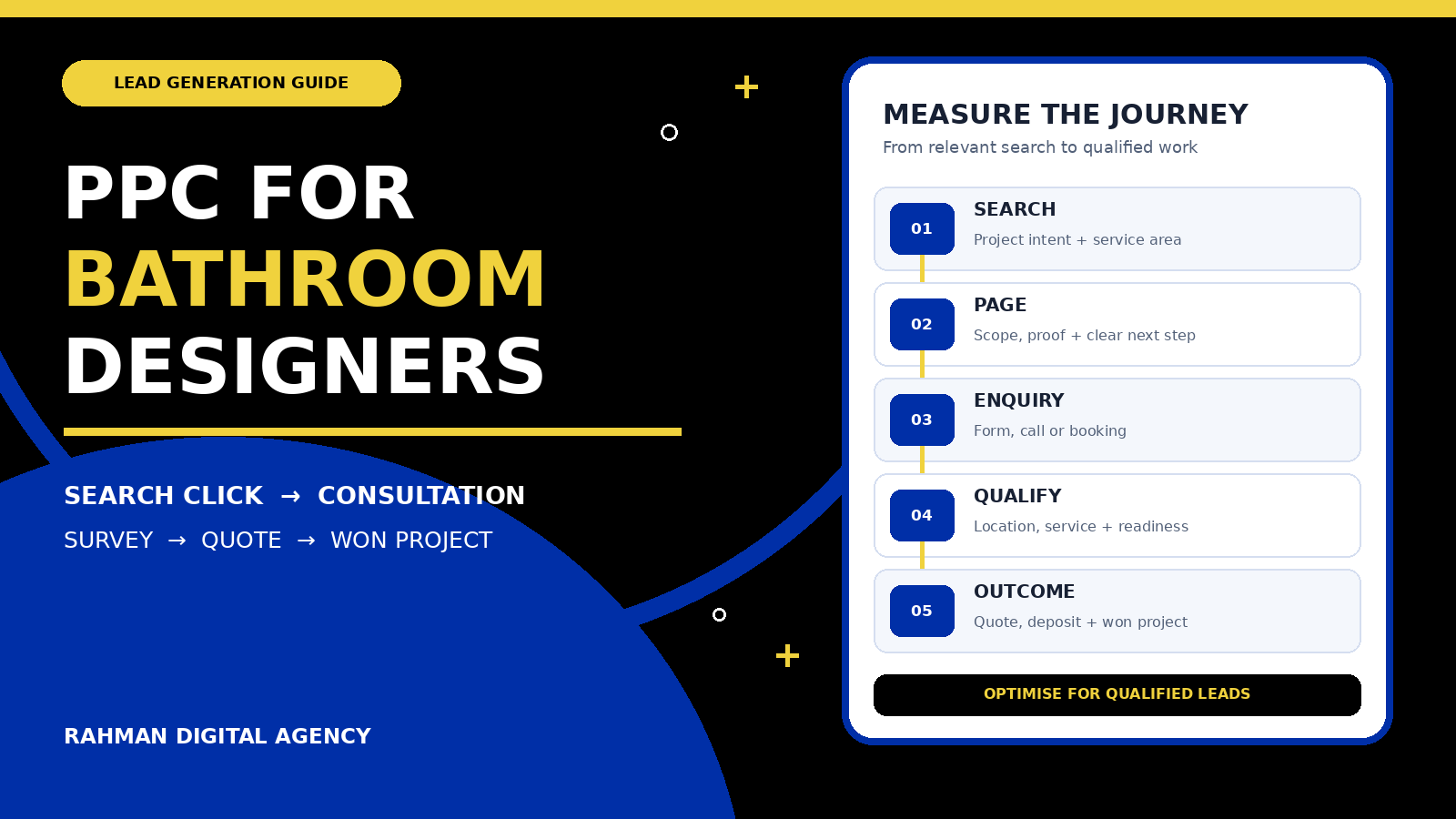
A bathroom PPC campaign should do more than generate clicks. It should help the right local prospects move from a relevant search to a design consultation, survey, quote and—when the fit is right—a profitable installation project.
Bathroom businesses often sell a complex service rather than a simple online product. A prospect may research styles, compare showrooms, request a home survey, discuss layout constraints, approve a design and only then accept a quote. If a campaign optimises only for cheap clicks or every form submission, it can favour activity that never becomes a suitable project.
This guide is for bathroom designers, showrooms and design-and-install companies. It is not aimed at emergency plumbers, DIY retailers or commercial washroom-partition suppliers. That distinction matters because those audiences can use similar words while expecting very different services.
1. Define a qualified bathroom project before choosing keywords
Start with the commercial definition of a good enquiry. The media plan should reflect the jobs the business can deliver, the places it serves and the level of project it wants to win. A broad goal such as “more bathroom leads” is too vague to guide targeting or measurement.
Service fit
Does the prospect want design only, supply only, installation, a complete renovation or a specialist service such as accessible bathroom design? State which combinations you actually provide.
Location fit
Set a realistic service radius based on survey capacity, installer travel and project economics. A click outside that area is unlikely to become a workable consultation.
Project fit
Decide whether you serve single-room refurbishments, premium bespoke projects, developer packages or another defined segment. The page and enquiry questions should make that scope clear.
Readiness fit
A useful lead usually has a property, a genuine project need and a reasonable next step. Inspiration browsing can still matter, but it should not be valued like a booked survey.
Write these criteria down before launching. They become the basis for campaign structure, negative keywords, landing-page copy, sales follow-up and the stages you import back into Google Ads.
2. Work backwards from project economics
A sensible PPC budget begins with business economics, not a competitor’s claimed spend. You need estimates for average project revenue, gross margin, the percentage of enquiries that are genuinely suitable, the percentage of qualified consultations that receive a quote, and the percentage of quotes that become won projects.
Planning formula: maximum affordable cost per raw lead = target acquisition cost per won project × lead-to-project conversion rate.
If the inputs are uncertain, use a conservative range and update it with real sales outcomes. Do not use a target copied from another showroom whose prices, locations, capacity and close rate may be different.
For example, if the business can afford a defined acquisition cost for a completed project, the acceptable cost per enquiry depends on how many enquiries reach that outcome. Improving qualification and follow-up can change the economics even when click prices stay the same. This is why campaign reporting should include qualified consultations, quotes and won work—not just leads.
3. Build campaigns around services and buying intent
Google recommends organising related ads and keywords into closely themed ad groups. For a bathroom design business, the structure should mirror meaningful differences in the offer. Avoid creating dozens of tiny groups with no practical purpose, but do not place every bathroom-related search in one undifferentiated campaign.
| Theme | Likely intent | Landing-page emphasis |
|---|---|---|
| Bathroom design consultation | Prospect wants professional layout or style help | Design process, portfolio, consultation format and next step |
| Bathroom design and installation | Prospect wants one provider to manage the project | Scope, trades coordination, installation area and project journey |
| Luxury or bespoke bathrooms | Prospect values custom design, materials and finish | Relevant work, design detail, suitability and consultation |
| Bathroom renovation | Prospect is replacing or reconfiguring an existing room | Survey, planning, removal, installation and realistic dependencies |
| Accessible bathroom design | Prospect needs a specific functional outcome | Relevant capability, assessment process and careful claim language |
Use keyword match types to control how closely a search must relate to a keyword, but do not assume one match type is always best. A cautious launch may use tightly controlled phrase and exact themes while the team learns what converts. Broader matching can be tested when conversion data, negatives, budget and review capacity are strong enough to manage it.
Keep the broad Google Ads guide for interior designers as a wider planning resource. Bathroom PPC deserves its own page because the buying journey, service radius and qualification questions are more specific.
4. Separate project intent from expensive distractions
Relevant traffic is not simply traffic containing the word “bathroom.” A person searching for bathroom design software, free floor plans, training, jobs, salaries, DIY tutorials or individual retail products may not want a managed design-and-install service.
Build negative keywords from the actual offer, then review the search terms report regularly. Google explains that negative keywords prevent ads from showing for matching excluded terms, while the search terms report helps reveal the queries that triggered ads. The right exclusion list is business-specific: a showroom that sells products separately should not automatically block product-only searches, and a company recruiting designers should handle job terms differently from a company that is not hiring.
Apply exclusions at the correct level and check them before publishing. An overly broad negative can hide profitable searches. Use the detailed negative keyword guide for match behaviour and maintenance, rather than turning this bathroom-specific plan into a generic keyword manual.
5. Make the ad and landing page tell the same story
A prospect who searches for a bathroom design-and-install company should not land on a generic homepage that makes them work to discover whether bathroom projects are offered. Google’s landing-page guidance emphasises relevance, usefulness, ease of navigation and a good mobile experience. The practical implication is straightforward: the page should immediately confirm the service, location and next step promised by the ad.
A strong bathroom project page should usually include:
- A clear description of design, supply and installation scope
- The service area and any visit or survey conditions
- Relevant bathroom photography with honest captions
- A simple explanation of consultation, survey, design, quote and installation
- Who the service suits—and who it does not
- Trust signals that can be verified
- Realistic information about dependencies and timelines
- A visible phone, form or booking route
- Privacy information near data collection
- Fast, readable mobile presentation
Do not invent awards, local offices, turnaround promises or project results. Use proof the business can substantiate. If pricing varies after survey, explain what affects a quote rather than displaying a misleading “from” figure with no context.
For deeper page planning, use the Google Ads landing-page conversion guide. The purpose here is message match: each ad group should arrive at the most relevant useful page, with one obvious next action.
6. Ask enough to qualify without creating a form obstacle
A first enquiry form should help the team decide whether a conversation is worthwhile, but it should not feel like a technical tender document. Ask for information the sales team will genuinely use. For many bathroom design firms, that may include postcode or area, property type, desired service, approximate project scope, preferred timing and the best contact method.
Budget questions can improve qualification when they are framed respectfully and use ranges that match the business model. If a range is required, explain why. Do not force a visitor to choose specifications, page counts or detailed features before a designer has understood the room and goals.
Provide alternatives. Some prospects prefer a call; others need a form they can complete outside showroom hours. Track the actions consistently with the guides to measure form submissions and track phone-call conversions.
7. Measure the whole path from click to installed project
Google Ads conversion measurement can report valuable actions that happen after an ad interaction. For a bathroom business, the initial form or call is only the start. Create a shared lead-stage definition so marketing and sales use the same language.
- Enquiry received: a call, form or booking reaches the business successfully.
- Contact made: the team reaches the prospect and confirms the request is genuine.
- Qualified consultation: service, location, scope and readiness fit the business.
- Survey or design appointment: a meaningful next step is booked and attended.
- Quote issued: the business provides a proposal for a suitable project.
- Project won: a deposit, signed agreement or other verified sales milestone is recorded.
Where practical, use offline conversion tracking to send qualified and won outcomes back to Google Ads. Enhanced conversions for leads can use securely hashed first-party information to improve the connection between a website lead and a later offline result. These features require accurate implementation, appropriate disclosure and responsible handling of customer data; they are not a substitute for consent or privacy obligations.
Consent mode communicates a visitor’s consent choices to Google and adjusts tag behaviour. It does not collect consent on its own and should not be treated as a legal-compliance shortcut. Configure the site’s consent process for the jurisdictions and technologies involved, and obtain professional advice when needed.
8. Match bidding and ad messages to the evidence available
A new campaign should not pretend to have conversion history it has not earned. Choose bidding settings according to the account’s real measurement quality, budget and volume. If the conversion actions include unqualified micro-actions or duplicate events, an automated strategy may optimise toward the wrong behaviour. Correct the measurement before asking the system to find more of it.
Write ads that make the service clear without unnecessary hype. Useful messages may describe the design-and-install scope, consultation route, service area, showroom or home-survey process, and a genuine point of difference the business can prove. Keep each claim consistent with the destination page. Avoid unsupported superlatives, artificial urgency and promises about completion dates or prices that depend on a survey.
Give the account enough relevant creative material to test meaningful combinations, but review the final message a prospect actually sees. Check that phone numbers, location information, sitelinks and other assets lead to current, helpful destinations. A bathroom portfolio link should show bathroom work; a consultation link should explain the consultation rather than redirecting to a generic contact page with no context.
Budget changes should reflect qualified demand and operational capacity. Spending more is not useful if the sales team cannot answer calls, surveys are booked too far ahead, or installers cannot serve the targeted locations. Conversely, a tightly capped campaign may not gather enough data to assess a niche theme. Document the constraint, then test within a limit the business can support.
9. Optimise for lead quality, not the cheapest visible metric
A low cost per form can be misleading if the forms are outside the service area, product-only requests, job enquiries or projects the company cannot fulfil. Review campaign performance with sales outcomes attached.
Useful weekly questions include:
- Which search terms produced qualified consultations rather than raw enquiries?
- Which locations generated projects the installation team could serve efficiently?
- Which service themes progressed to survey, quote and deposit?
- Were missed calls or slow follow-up causing otherwise suitable leads to be lost?
- Did any ad promise something the landing page or sales process could not deliver?
- Are automated bidding decisions receiving enough accurate conversion data to be trustworthy?
Change one important variable at a time where possible and record why the change was made. Avoid reacting to a handful of clicks as if they prove a trend. Search demand, project value, close rates and seasonality vary by market, so use the account’s own qualified-lead and revenue data.
10. A practical 30-day launch checklist
Before launch
Confirm service scope, locations, project-fit rules, conversion actions, consent behaviour, landing-page message match, call handling and the sales-stage fields that will be recorded.
Days 1–7
Check ads, forms, phone routing and conversion events end to end. Review search terms and locations frequently. Correct obvious irrelevance without making broad changes from tiny samples.
Days 8–21
Compare ad groups by qualified consultation rate. Add evidence-based negatives, improve weak message match and verify that enquiries are being followed up consistently.
Days 22–30
Review the first complete lead-stage picture: enquiry, contact, consultation, survey, quote and won project. Use it to decide what deserves more testing and what should be constrained.
A month may be enough to find implementation problems and obvious intent gaps, but it may not be enough to prove long-term profitability—especially for a smaller account or a long project cycle. Make decisions according to the volume and quality of evidence actually available.
Authoritative platform references
- Google Ads: Organize your account with ad groups
- Google Ads: About keyword matching options
- Google Ads: About negative keywords and the search terms report
- Google Ads: Landing page guidance
- Google Ads: About conversion measurement
- Google Ads: About enhanced conversions and enhanced conversions for leads
- Google for Developers: Consent mode overview
Need a measurable PPC plan for your bathroom design business?
Rahman Digital Agency can review campaign structure, search intent, landing-page alignment and conversion measurement, then recommend a practical next step based on your service area and sales process.